NOW THAT YOU HAVE THAT KINDLE, NOW WHAT?
by ECM | January 20, 2012 11:03 pm
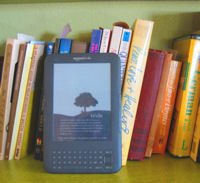
by Mayan Avitable
Amazon itself offers many free books to read. One of the popular sections of Amazon’s Kindle Store contains thousands of Kindle popular classics[1]. Each classic can be downloaded in less than a minute. There are also more than 45,000 free books[2] of all kinds to download on Amazon. Amazon also has a lending library that requires a prime membership.
Another source of free books is archive.org[3]. It is a non-profit source dedicated to offer access to historical collections. There are over 2.5 million free books offered on this site. To make the books here available to your Kindle, connect your computer and your Kindle using the USB port, and drag the file to your Kindle.
The website ereadernewstoday.com[4] is another source of free books. The site also has many resources like accessories and bargain books for Kindles and other ebooks.
Open Library[5] contains 1,011,817 ebooks[6]. Make sure to check only to show the ebooks, and send to Kindle to download books. This site also has a library section that allows the reader to borrow ebooks[7].
Project Gutenberg[8] is one of the first sites to makes books available online. There, look for books by topic, look for the ebook section, and download via your USB port.
Other sources for Kindle books include: Many Books[9] has more than 26,000 titles you can download using your USB port; Free ebooks[10] offers free books for Kindle using the mobi format when downloading (This site even has quite a few books in Spanish); and Free Book Spot[11] that offers a catalog of many books in various languages in addition to an extensive collection in English.
- Kindle popular classics: http://www.amazon.com/s/?node=2245146011
- 45,000 free books: http://www.amazon.com/s/ref=nb_sb_noss?url=search-alias%3Ddigital-text&field-keywords=free+books
- archive.org: http://www.archive.org/details/texts
- ereadernewstoday.com: http://ereadernewstoday.com/
- Open Library: http://openlibrary.org/
- 1,011,817 ebooks:
- borrow ebooks: http://openlibrary.org/borrow
- Project Gutenberg: http://www.gutenberg.org/wiki/Main_Page
- Many Books: http://www.manybooks.net/
- Free ebooks: http://www.free-ebooks.net/
- Free Book Spot: http://www.freebookspot.es/Catalogue.aspx
Source URL: https://webvibrantamerica.com/now-you-have-kindle-now-what/